It’s time to begin the second part of our Zimbra investigation. If you haven’t read the first part yet, we strongly recommend starting HERE before continuing.
In this second part, we’ll assume that an attacker has managed to compromise a Zimbra account and that we’ve already identified their entry point (initial access). We’ll now analyze how to leverage Zimbra logs to identify the malicious actions the attacker could have carried out from their access. We’ll then see what remediation measures to implement to prevent this type of incident and respond to it effectively.
Get comfortable (and make sure your coffee is still hot): let’s dive right into the heart of the matter!
Investigating in a Zimbra Environment
Now that Zimbra’s infrastructure and logs hold no secrets for you, it’s time to get practical.
Imagine you’re a forensic analyst, arriving early one morning, when suddenly: the phone rings. You’re being called because several users are reporting that emails, they didn’t send are appearing in their “Sent” folder.
Panic ensues! Users are afraid to log into their mailboxes, and some administrators start wondering whether the Zimbra infrastructure itself might be compromised.
Since you know Zimbra inside out, the team naturally turns to you to investigate this incident!
As a forensic analyst, many questions come to mind:
- Have the accounts really been compromised? If so, how and since when?
- How many users are affected?
- What is the attacker’s objective, and what malicious actions have been carried out from these accounts?
- Have the mail server or other Zimbra components been compromised?
- And, most importantly: do I have time for a coffee ☕️ before the information hunt begins?
To help you in your investigation, we’ll look at how to answer these questions through Zimbra log analysis. But first, here are some tips to guide your investigation.
During incident response, it’s easy to feel overwhelmed by the amount of logs and events to analyze. Keeping a clear line of reasoning is essential. A few simple practices can help maintain focus:
- Confirm: Verify the information that triggered the incident. Before diving deeper, ensure the initial alert is accurate. This undeniable baseline will serve as the foundation for the entire investigation.
- Correlate: Cross-check suspicious IP addresses and domains with other sources (proxy, VPN, EDR, online antivirus databases). This provides additional context related to the identified indicator.
- Pivot: Use the collected information to expand your analysis. An attacker might reuse the same IP address or user-agent across multiple accounts. Conversely, a compromised account might be accessed from different IP addresses or user-agents. Pivoting can reveal other indicators that help identify the attacker.
- Compare patterns: Even without direct access to email content or attachments, certain elements can reveal similarities (file size, identical filenames, repeated sequences of actions after account compromise). This behavioral analysis approach can help identify multiple users compromised by the same attacker. Such hypotheses should be formulated and handled cautiously, but they can be valuable for confirming intuition.
- Ensure log preservation: This may seem obvious, but as soon as an incident is detected, securing the logs is critical. Collect logs immediately from the entire Zimbra infrastructure and extend their retention period to prevent automatic deletion. Because let’s be honest: logs disappearing just as the forensic team arrives is a way too common scenario… one you definitely want to avoid.
While these tips aren’t exhaustive, they provide a solid foundation for conducting an analysis that is both fast and efficient.
Post-compromise activity
Analysis of user activity
What mastery! You have successfully traced back to the initial entry point used by the attacker to compromise user accounts. You have identified the malicious IP addresses, spotted the User-Agent used, and even uncovered other compromised accounts thanks to this information. In short, clean and efficient work. Impressive!
But… we still haven’t answered a crucial question: “What was the attacker’s objective, and what actions did they take from the compromised accounts?“
To find out, you now need to analyze the attacker’s activity within the Zimbra infrastructure. Once authenticated, an attacker can indeed:
- Launch an internal or external phishing campaign
- Send messages aimed at tricking a colleague, partner, or client into taking action (CEO fraud, fictitious urgent requests, etc.)
- Exfiltrate sensitive data from mailboxes
In this section, we will examine some examples of suspicious activities that can be identified from Zimbra logs.
Sending a large number of emails in a short amount of time
You want to determine whether compromised accounts were used to conduct additional phishing attempts by sending mass emails to internal or external recipients. Unfortunately, Zimbra does not provide a native event that allows you to retrieve this information directly. However, a simple grep command will get the job done.
The command below extracts the number of messages sent by each user over a specific period (here, from November 21 to November 27, 2025):
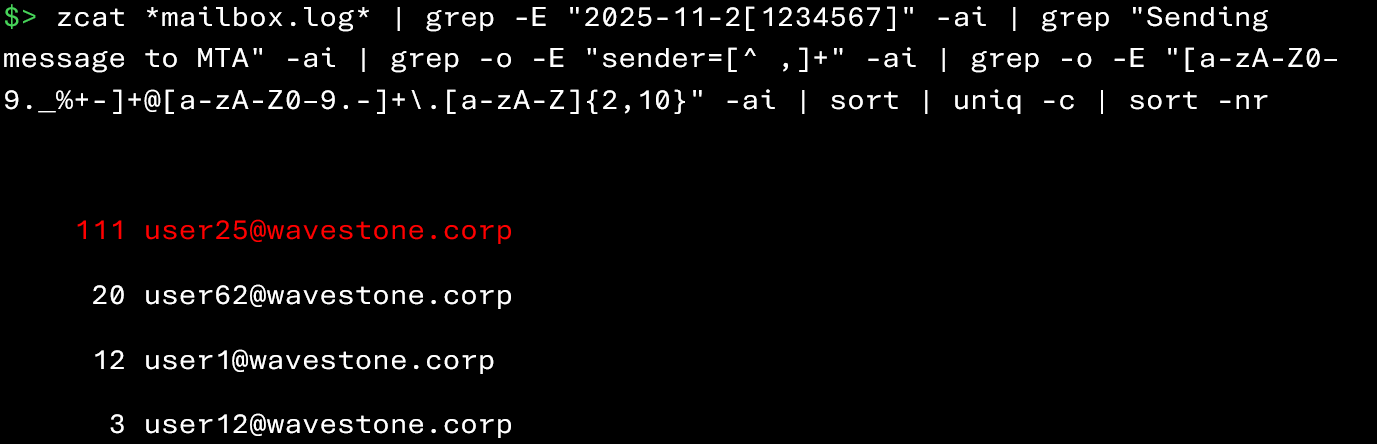
In this example, user25@wavestone.corp clearly stands out with a sending volume far above normal. An unusually high volume of emails sent from a mailbox over a short period constitutes suspicious activity.
In legitimate use, mass email sending is relatively rare and is generally associated with generic addresses or internal communication systems (e.g., newsletters, HR announcements). When a standard user account exhibits this type of behavior, it is important to:
- Determine whether this is normal, recurring activity for the user
- Check the sending time frame, IP address, and User-Agent
- Verify whether any suspicious attachments were associated with the emails
Mass email sending can trigger built-in protection mechanisms in Zimbra, including quota rules. These thresholds are designed to limit the volume of messages sent by an account over a given period to prevent abuse, spam, or phishing campaigns.
The two commands below allow you to retrieve events related to quota exceedances:


The appearance of error messages related to quota exceedances is a signal not to be ignored, because:
- Either the legitimate user accidentally exceeded a quota
- Or the account is being used fraudulently to send mass emails
Since this indicator can generate a large number of false positives, it is recommended to correlate it with other information in order to draw meaningful conclusions.
Sending an email to a large number of recipients
To avoid triggering a quota‑exceedance alert, a more seasoned attacker may adopt a more “subtle” strategy. Instead of sending dozens of individual emails (a noisy method), they may choose to send a single message addressed to a long list of recipients: an efficient way to optimize their phishing campaign.
Fortunately for you, Zimbra logs make it possible to identify the number of recipients associated with each sent email, which makes this type of maneuver detectable without too much effort.
The commands below allow you to identify emails sent to an unusually high number of recipients:


Here, you can observe that the user user25@wavestone.corp sent an email to 211 recipients. Such behavior is clearly suspicious.
In practice, it is rare for a personal email address to send a message to several dozen recipients simultaneously. This type of volume is usually associated with shared mailboxes or generic addresses (e.g., internal communications, HR services, institutional announcements).
When a standard user account exhibits this kind of activity, it is essential to:
- identify the usual communication practices within the organization
- determine whether this sending volume is normal or recurrent for the user in question
- examine the time window, IP address, and user agent used during the sending
- check if any potentially malicious attachments were associated with the messages
To save time, it is often relevant to confirm directly with the user whether the sending was legitimate.
The example presented here isolates sends containing more than 100 recipients. However, this threshold should be adjusted depending on:
- the usual volume within the organization
- the type of accounts involved
- and the period covered by the logs analyzed
Uploading suspicious attachments
Unlike email reception, the upload of suspicious attachments is better logged by Zimbra. Each time a user attaches a file to a new email, Zimbra carefully records the operation in its logs.
Using the commands below, you can retrieve the attachments added to emails by a potentially compromised user:


Similarly to the reception of malicious attachments, you can search in the logs for:
- the upload of attachments with suspicious extensions (e.g., .htm, .html, .exe, .js, .arj, .iso, .bat, .ps1, or Office/PDF documents containing macros);
- files already observed earlier during the initial phases of the incident (for example, a document downloaded by patient zero);
- correlating upload activities with malicious source IP addresses or accounts identified as compromised.
This list is not exhaustive; it may be relevant to search for any type of file that seems pertinent to the context of your investigation.
Removal of traces
Now that you have a clear picture of what the attacker did with the compromised accounts, you are disappointed because you cannot locate the emails in question. You suspect that the attacker erased its traces. But how can you verify this?
Indeed, after sending malicious emails, an experienced attacker may try to hide its tracks from the legitimate mailbox owner by deleting sent emails or returned messages.
Fortunately, the following commands will allow you to identify email deletions performed in Zimbra:
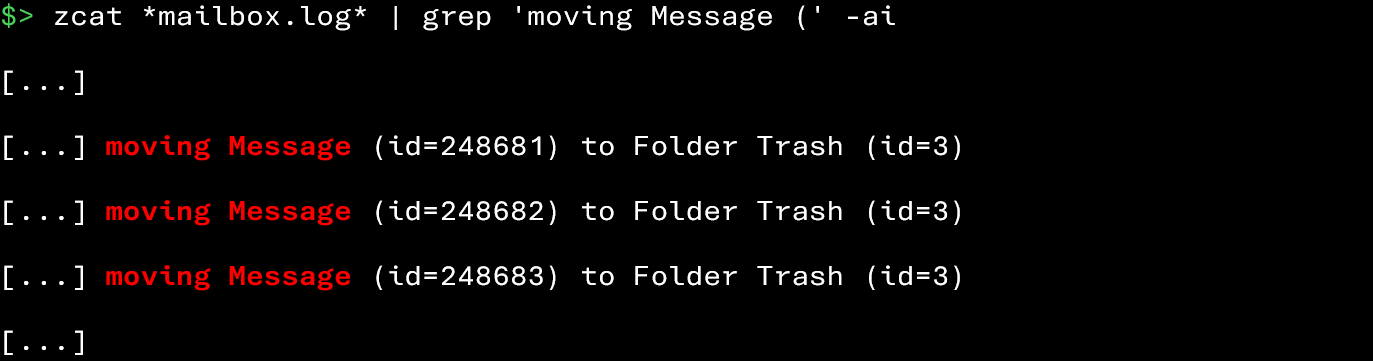
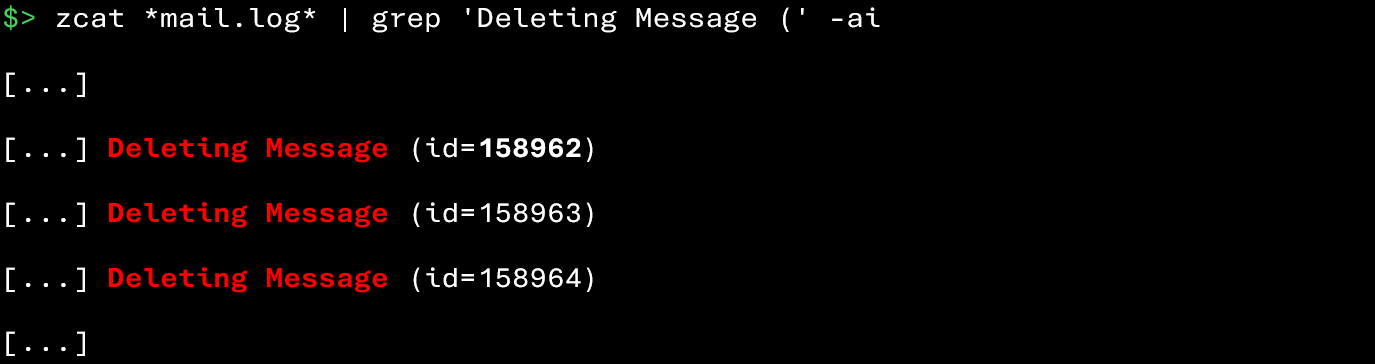
In legitimate use, it is not uncommon for a user to delete multiple emails (e.g., inbox cleanup, managing newsletters). However, the situation becomes suspicious when deletions occur:
- Immediately after a mass email sending
- Targeting specifically the most recently sent messages
During your investigation, keep in mind that an attacker may also attempt to delete:
- Read receipts generated by their emails
- Automatic replies (out-of-office messages, NDRs) that could alert the victim
It is therefore important not to overlook deletions and to correlate them with other indicators (suspicious authentications, mass email sending, quota exceedances, connections from malicious IPs) to assess the legitimacy of these actions.
Data exfiltration
One question still troubles you… Among the compromised accounts, some belonged to users who handled sensitive data for the company. You therefore want to determine whether the attacker attempted to exfiltrate any email they had access to.
Unfortunately for you, Zimbra does not log the direct download of emails. After all, retrieving messages via IMAP or SMTP is essentially a “download” from the server to the mail client. It is therefore difficult to distinguish a normal transfer from a malicious download. And in the Nginx logs (which expose the webmail), the same issue arises: it is impossible to precisely identify whether an email was downloaded.
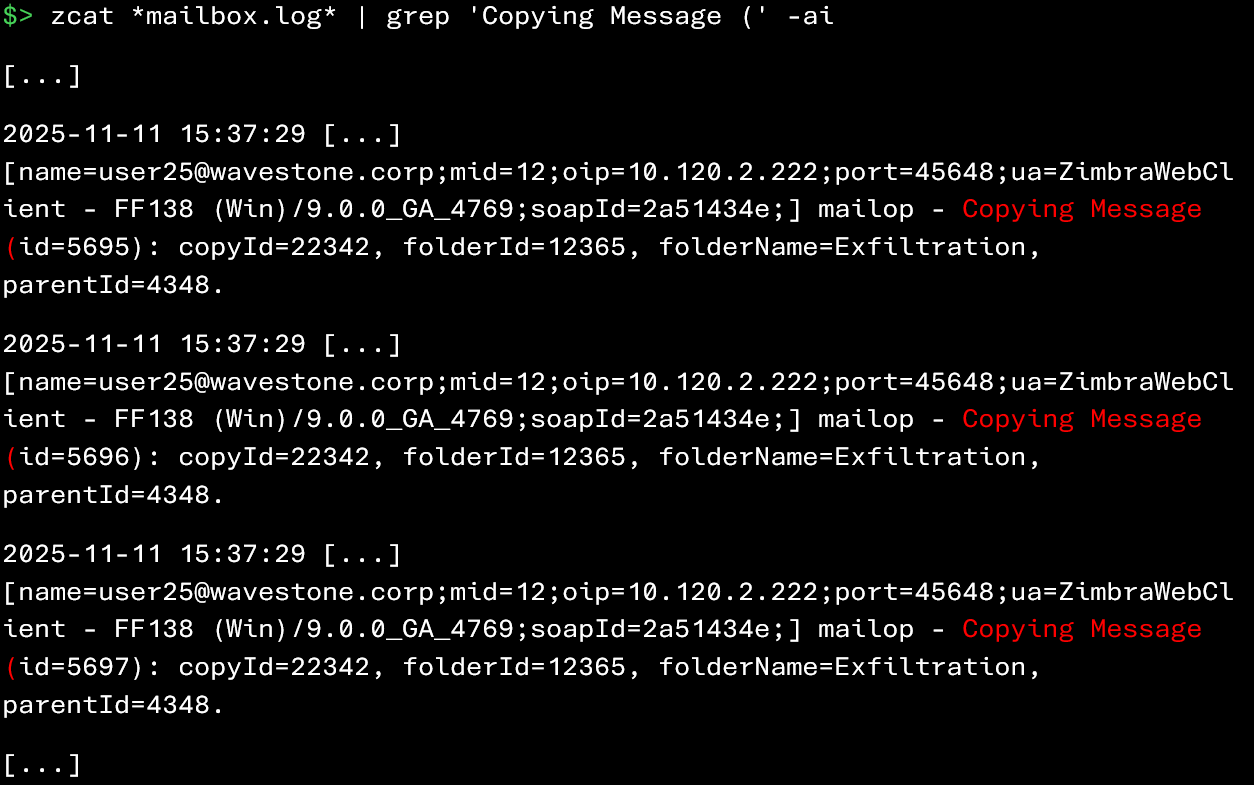
As a small consolation, Zimbra does log certain internal operations, particularly copy actions performed within the mailbox. An attacker could, for example, create a folder to store sensitive emails before extraction.
The following command allows you to identify a massive copy of emails into a folder (here named “Exfiltration“) from the web client:
The following command allows you to identify a copy of a large number of emails in a folder from an IMAP thick client:
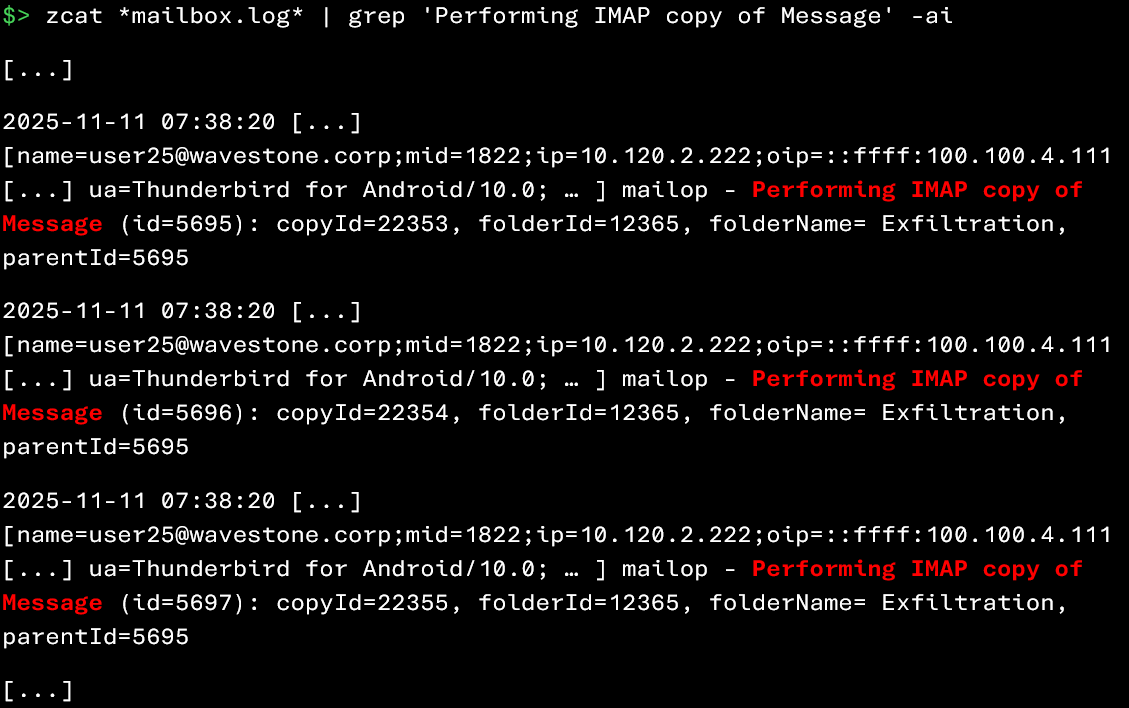
Although there are legitimate cases (e.g., manual backup by the user), this type of activity should raise attention, especially when correlated with:
- Logins from unusual IP addresses
- Suspicious authentications
- Mass email sending
However, as you can see, it is very difficult to confirm a data exfiltration. Therefore, it should be assumed that if a mailbox is compromised, the attacker potentially had the ability to download all emails of the affected user.
Detection of antivirus and antispam solutions
We haven’t really covered this until now, but it’s important to know that Zimbra natively integrates Amavis, a “central” component that orchestrates various security engines. These engines help identify suspicious files, phishing campaigns, and mass spam sending. It is therefore valuable to leverage these detection mechanisms when analyzing an attacker’s activities.
During your investigations, examining the messages generated by Amavis can help highlight:
- Messages blocked before reaching the user’s mailbox (e.g., spoofing attempts)
- Malicious attachments detected and placed in quarantine
- Violations of certain security policies defined on the platform
Amavis
It is possible to retrieve certain events generated by Amavis with the following commands:

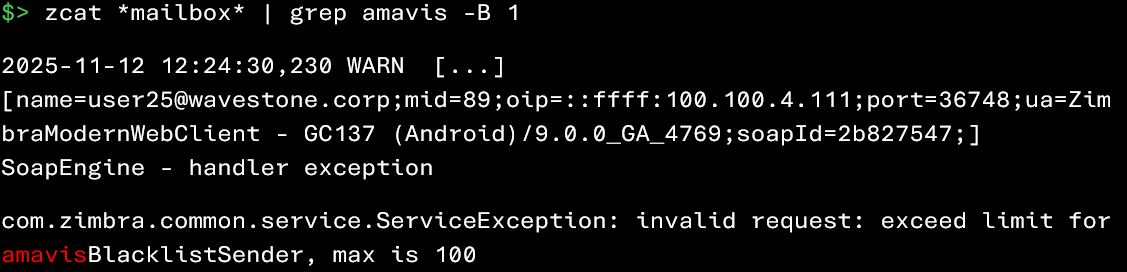
Since Amavis generates a large number of events, it may be wise to focus your investigation on detections related to spam and phishing. Note that the identification of phishing messages has already been discussed in a previous section of this article (“Account Compromise via Phishing Attack“)
Incoming spam
It may be useful to identify messages that have triggered incoming spam detections. When a message is classified as spam, Zimbra generates logs indicating the reason for this categorization.
These events can contain several useful pieces of information:
- The affected account
- The unique identifier of the message in the mailbox
- The originating IP address of the email
- Additionally, in the case of a SpamReport:
- The result of the analysis (isSpam field)
- The action taken (e.g., moving the message from the Inbox to Junk)
- Sometimes the recipient of the report used for training or reporting purposes (e.g., a dedicated address such as spam@wavestone.corp
The following command can help you identify events related to the processing of incoming spam:
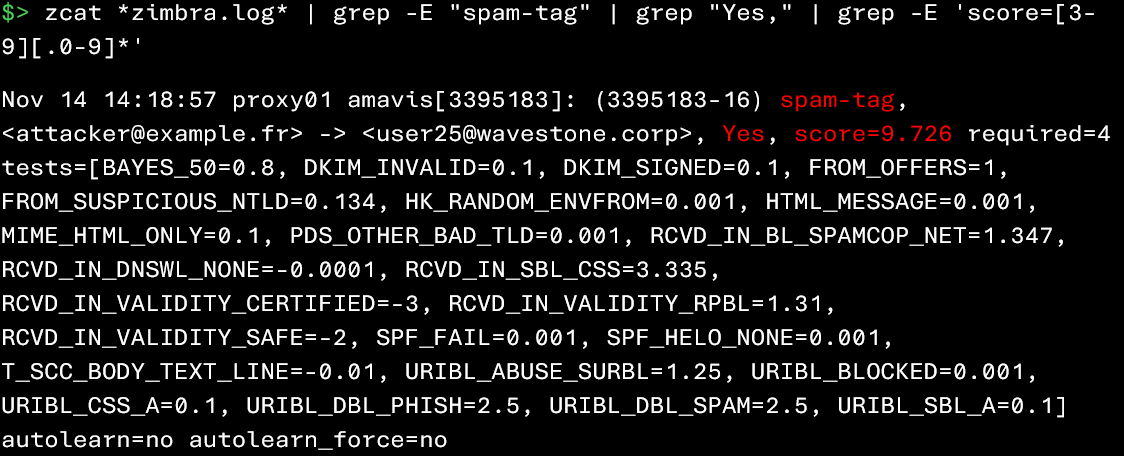

Since spam detections generate a large number of false positives, it may be useful to narrow the scope of your investigation as much as possible (for example, by focusing on a specific time period or a specific set of users).
Outgoing spam
The threat does not always come from outside. Some malicious emails sent from compromised internal accounts to external recipients can leave very interesting traces in Zimbra’s logs. Indeed, if the message sent from the compromised account is blocked by the recipient mail server’s antispam solution, that server will send an error notification back to the Zimbra server to report the rejection.
Analyzing these non-delivery reports (NDRs) can therefore raise a red flag:
it may reveal that a user is compromised… or that an account has been used in an attempt to send malicious emails.
It is possible to extract these rejected messages using the following command:

Outgoing spam is generally rare. Analyzing it only becomes truly useful in cases where the attacker attempts to lateralize to external email accounts.
Remediation measures
You have conducted your investigation at full speed: compromised users identified, malicious IP addresses cataloged, suspicious activities analyzed… in short, you have traced the attack with surgical precision. It is now time to move to the next step: remediation.
The primary goal of remediation is to remove the attacker’s access to the infrastructure, implement detection mechanisms capable of preventing further compromise attempts, and strengthen user awareness to limit the impact of ongoing and future phishing campaigns.
By collecting various indicators related to the phishing campaign (compromised or suspected accounts, email addresses, malicious IPs and domains, etc.), it is recommended to implement a series of corrective and preventive actions (non-exhaustive):
- Reset passwords for suspected accounts: For any user who has been compromised or is suspected of being compromised, a password reset is required.
- Block malicious domains, IP addresses, and email addresses: Infrastructure elements used by the attacker (domains, IPs, senders) should be blocked using available network solutions (proxy, firewall, mail filters) as soon as they are detected. This will limit the risk of further propagation.
- Perform antivirus/EDR scans on compromised user workstations: Workstations of compromised users should undergo antivirus or EDR analysis to:
- Detect and remove any potential malicious files
- Ensure that phishing-related files are no longer present on the workstation
- Strengthen user awareness: Communication about ongoing phishing campaigns should be sent to users to prevent further compromise. Regular phishing awareness campaigns are strongly recommended, particularly for users who have already been compromised.
- Implement multi-factor authentication (MFA) for Zimbra mail access: Deploying a second authentication factor is highly recommended to secure mailbox access. While MFA can be perceived as inconvenient, using a Single Sign-On (SSO) with unified MFA can reduce friction while strengthening overall authentication security.
- Deploy a specialized phishing detection and filtering solution: It is recommended to install a specialized solution in detecting malicious activity in email environments. The solution should be able to identify:
- Logins from unusual IP addresses
- Brute-force attempts on user accounts
- Mass email sending to numerous recipients
- Use of suspicious attachments or links to untrusted domains
- Active phishing campaigns (e.g., identified by a CTI service)
- Ensure Zimbra log retention: It is important to secure the collection and retention of logs. It is recommended to centralize logs from the entire Zimbra infrastructure on a server external to that infrastructure. This ensures that even in the event of compromise, modification, or encryption of Zimbra servers, logs remain intact and accessible, allowing reliable forensic investigations.
Although non-exhaustive, these remediation measures will help restore confidence in your Zimbra infrastructure and user accounts. Continuous monitoring and improvement of the security posture will, however, be necessary to adapt to future threats.
At the end of this little investigation, one thing is certain: while the attacker can choose the easiest path, the forensic analyst doesn’t have that luxury. Between scattered (or sometimes missing) logs, conflicting user testimonials, and limited visibility into certain Zimbra events, conducting an investigation can sometimes feel like solving a Rubik’s Cube… in the dark… with mittens on.
But with a solid methodology and a few good habits, Zimbra can reveal far more information than it might seem at first glance. Its logs are a real goldmine, provided you don’t get lost in them.
Ultimately, this article does not aim to turn every reader into a Jedi master of Zimbra forensics… but if it can save you two days of trying to decode Zimbra logs or hunt down the useful information, then the goal has been achieved!
And as is often said, in cybersecurity as elsewhere, prevention is better than cure. So harden your Zimbra infrastructure, back up your logs, raise user awareness… and above all, don’t be short on coffee supplies!
Sources
- https://wiki.zimbra.com/wiki/Log_Files
- https://wiki.zimbra.com/wiki/Troubleshooting_Course_Content_Rough_Drafts-Zimbra_Architecture_Component_Overview
- https://wiki.zimbra.com/wiki/Trouble_Shooting_Spam_Score_Changes