Nowadays, security efforts primarily focus on web applications, internal infrastructures, Active Directory, and other traditional attack surfaces. Yet with the rise of remote work, employees’ workstations are increasingly exposed to theft.
In this context, the main security measure available to secure data at rest is full-disk encryption. For this, most companies rely on the built-in Microsoft disk encryption tool BitLocker. However, simply enabling disk encryption is often assumed to be sufficient to protect data at rest.
While BitLocker is presented as the solution to data confidentiality and integrity, it can still be bypassed, with either inexpensive hardware or software-based attacks. Such attacks lead to the total loss of confidentiality and integrity on the target machine.
In this article, we summarize how BitLocker works and build up on this knowledge to examine recent physical and logical attacks that continue to threaten workstations security.
Reminders about how BitLocker works
BitLocker is a full-disk encryption mechanism built into Windows since its introduction with Windows Vista in January 2007, defined as follows: “BitLocker is a Windows security feature that provides encryption for entire volumes, addressing the threats of data theft or exposure from lost, stolen, or inappropriately decommissioned devices.” (BitLocker Overview | Microsoft Learn)
Its security relies on a simple key hierarchy: the leakage of one key can compromise the whole disk.
Two keys are involved:
- the Full Volume Encryption Key (FVEK), which encrypts disk sectors
- the Volume Master Key (VMK), which encrypts the FVEK. This key is stored and protected by the Trusted Platform Module (TPM), a security component designed to store cryptographic secrets.
The FVEK is stored on disk encrypted by the VMK; during boot time, the decryption happens as such:
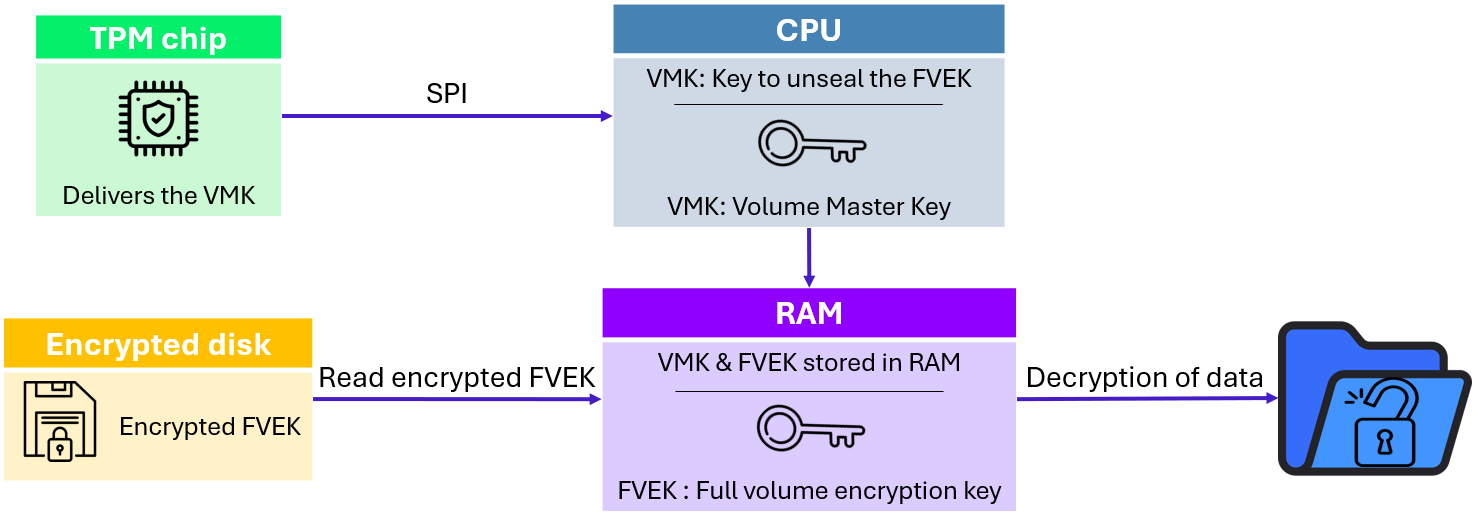
Workstation used as example in this article delivers VMK through SPI bus, but various other protocols such as LPC could be observed (LPC does not imply more security features than SPI).
The VMK is released during boot over an SPI bus (low-speed serial protocol with 4 signals’ lines) between the TPM chip and the CPU. This key is the most critical component, as it allows decryption of the entire disk.
This architecture shows that at a specific moment, the VMK is transmitted in clear text in the SPI bus and the FEVK key is stored un-encrypted in RAM. This configuration can be leveraged by attackers with various physical and logical attacks. The following sections describe how this behavior can be exploited.
Physical attacks
Physical attacks require dedicated physical equipment to exploit vulnerability. This typically involves using tools such as probes, logical analyzers and dedicated malicious peripherals.
Against BitLocker and TPM, hardware attacks can still, with few prerequisites, be exploited today. This section focuses on the two main hardware-based techniques: TPM sniffing and DMA attacks.
TPM sniffing
At rest, the VMK is stored and protected by the TPM. It is released on boot and transmitted to the CPU. TPM assumes that the communication channel is secure and cannot be compromised. However, on the motherboard, this communication channel is usually defined by a SPI bus linking different chips together.
Attack prerequisites:
- 140€ of probes and logic analyzers hardware.
- Physical access to a powered-off system.
- BitLocker configured without pre-boot PIN code.
The main idea behind this attack is to locate the bus where the VMK is transmitted, put probes to capture the data exchanged on the bus and extract the VMK when booting.
Therefore, the first step is identifying the TPM chip and its SPI interface. Thankfully, TPMs are standardized components with known pinouts. By examining the motherboard layout, datasheets, or publicly available information, the attacker can determine which pins correspond to TPM SPI signals.
Once the bus is identified, the attacker establishes a stable physical connection to the bus by attaching probes on the motherboard. In the current example probes used are Sensepeek SP10, for their precision. In practice, the SPI bus is often shared with other components that passively receive the traffic without processing it, such as the BIOS flash chip. Sniffing the bus from these components is frequently easier, and this is the approach used in our example below:
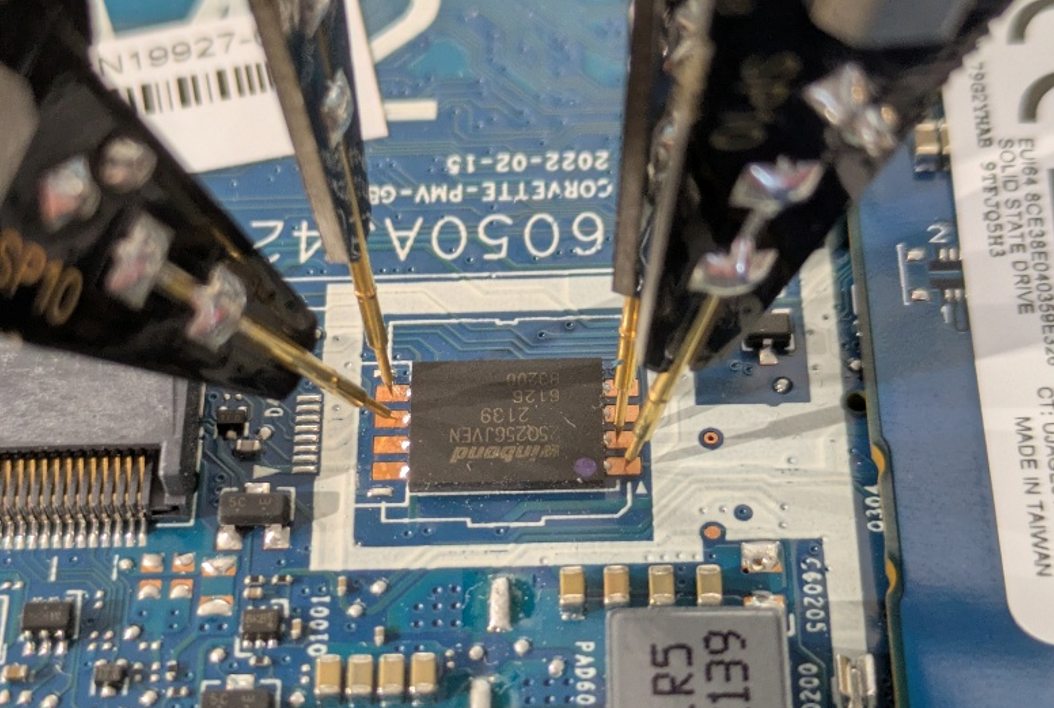
A logic analyzer is then connected to the probes in passive listening mode. This device permit to capture and decode digital signals. It allows signal analysis and translation in known protocol, such as SPI. In the current example, logical analyzer sipeed slogic16u3 is used. The only requirement is to use a logic analyzer with a sufficient capture rate. This allows signals to be captured at 200MHz, which is sufficient. Importantly, the attacker does not need to inject traffic or interfere with the bus; simply observing is sufficient.
Open-source projects such as PulseView can be used to interpret captured data. Publicly available plugins can then be used to decode electronic signals back into the communication protocols:
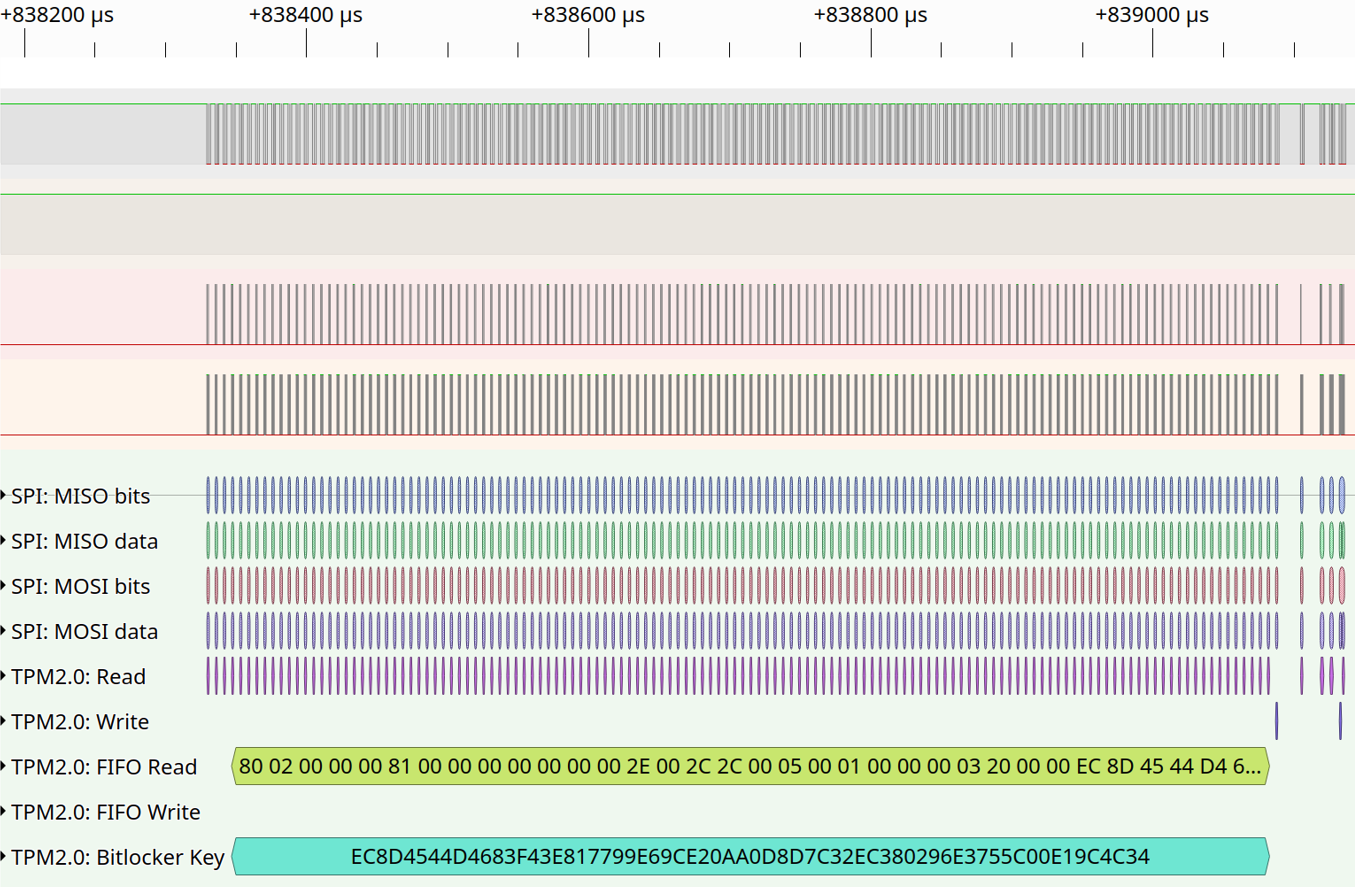
PluseView performs multiple steps in the same analysis. First, detected signals are translated into SPI protocol. Then, SPI protocol is translated into TPM commands, which are publicly documented. These commands have specific headers, such as memory read or write. These functions make it possible to interpret transmitted data and recover, as shown in the capture, the VMK.
At this point, BitLocker’s root secret has been compromised without altering the system state or triggering any integrity checks.
With the VMK recovered, the attacker can remove the disk and decrypt it offline using the open-source project Dislocker. This software simulates legitimate use of the VMK and find in BitLocker encrypted partition FVEK sector. Legitimate use of FVEK is then used to decrypt the entire Windows partition.
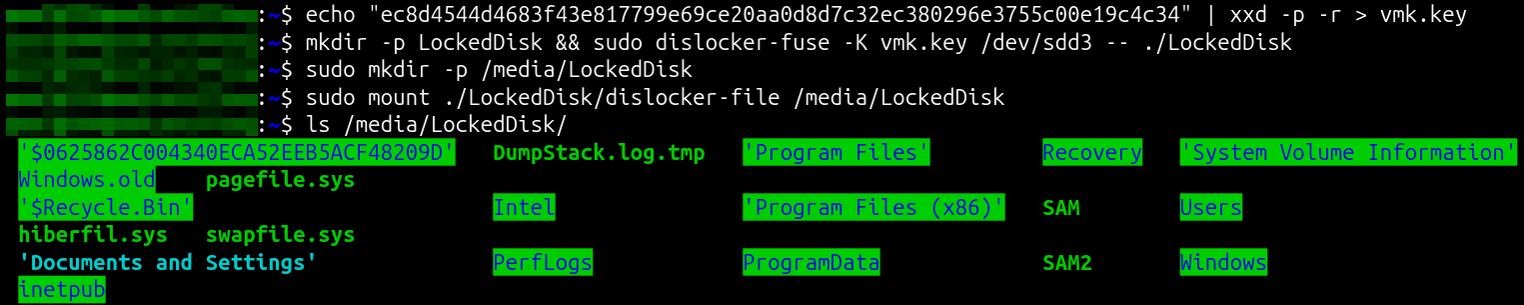
All data on disk becomes accessible, including system files, user data, and stored credentials. The impact is total loss of confidentiality and integrity. Unlike software-based attacks, this technique leaves no forensic trace on the system. This attack is an increasingly likely attack vector as hardware becomes more accessible, cheaper, and better documented.
Two major TPM versions exist, 1.2 and 2.0 (integrating cryptographic feature): this attack works on both versions. TPM sniffing remains possible on most workstations.
Still, on some newer laptop models, the TPM is directly integrated into the CPU (firmware TPM). These firmware TPM make TPM sniffing impossible. However, these types of TPM are new and not largely deployed.
Direct Memory Access
Direct Memory Access (DMA) is a legitimate feature that allows certain hardware components, such as network cards, graphics cards, or external devices connected via high-speed interfaces, to access a computer’s memory (RAM) directly, without constantly involving the processor (by synacktiv-slides-ng):
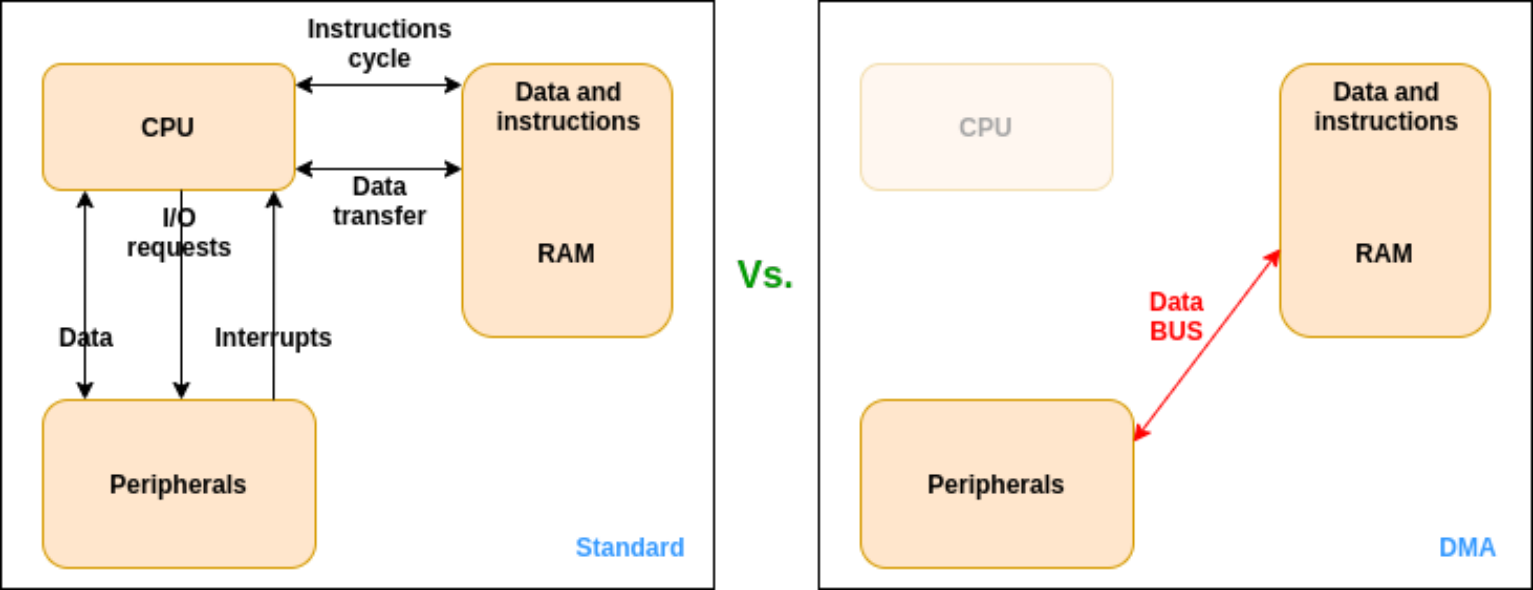
BitLocker assumes that memory accesses are controlled and trusted, with its keys stored in TPM or RAM, supposedly not accessible by an attacker. But this assumption can be broken. By exploiting this hardware-level trust, attackers with Direct Memory Access (DMA)-capable devices can read and manipulate memory, compromising workstation’s data confidentiality and integrity. The main idea behind this attack is to connect a DMA-capable device to the workstation and use it to directly read physical memory while the system is running.
Attack prerequisites:
- Approximately 160€ of hardware.
- Physical access to the workstation.
- BitLocker configured without pre-boot PIN code.
- DMA protections disabled (IOMMU / Kernel DMA Protection) in BIOS settings.
Modern systems rely on the Input-Output Memory Management Unit (IOMMU, Intel VT-d or AMD-Vi) to enforce memory isolation between peripherals memories and the rest of the system. The first step is ensuring that DMA protections are disabled in the BIOS.
BIOS passwords are often assumed to protect these settings. However, in practice they are weak control, and BIOS password removal techniques are well documented. As a result, an attacker with sufficient time and physical access can often disable IOMMU protections.
Once DMA protections are disabled, the attacker connects a DMA-capable device to an exposed PCIe interface. In the current example, a PCI-Screamer device is used. This device is used as a malicious PCIe peripheral that permits to communicate in DMA and execute customized commands onto the target system.
At this stage, the attack is orchestrated from the attacker’s workstation. Open-source project related to the PCI-Screamer, PCILeech, communicates with the PCI-Screamer over USB-C and issue commands that instruct it to read or modify specific physical memory regions on the target system.
The DMA hardware itself acts as a bridge: it exposes the target’s memory over PCIe:
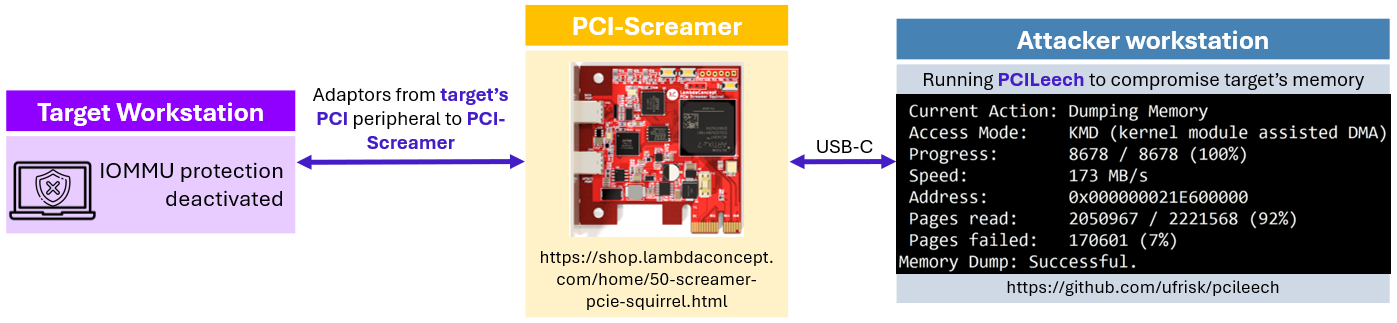
PCILeech has now the capacity to load vulnerable kernel drivers to provide functionalities such as:
- Executing kernel-level code on the target system
- Spawning SYSTEM shells and other executables (Windows)
- Pulling and pushing files (Linux, FreeBSD, Windows, macOS)
- Patching or removing password protections (Windows, macOS)
The impact goes far beyond simple data exposure. An attacker can extract the BitLocker encryption keys, access the decrypted disk offline, or even escalate directly to SYSTEM privileges on the running machine.
Although this vulnerability does not directly target BitLocker key material in the same way as TPM sniffing attacks, it breaks the fundamental assumption that enabling disk encryption is sufficient to protect the system.
Logical attacks
Unlike hardware attacks, these techniques rely entirely on legitimate Windows components and documented mechanisms. They are most often vulnerabilities subject to a patch by Microsoft. Several such attacks were disclosed in the past years.
BitPixie
The target of this attack on BitLocker is the transition between the Windows boot process and the recovery environment.
BitLocker assumes that once a boot sequence progresses into a recovery state, sensitive cryptographic material is properly cleared from memory. Under specific conditions, that assumption does not hold, and this behavior is leveraged by the attack commonly referred to as BitPixie (CVE‑2023‑21563).
Attack prerequisites:
- Physical access to the workstation.
- BitLocker configured without pre-boot PIN code.
- BIOS with Secure Boot enabled and Network access (PXE boot).
The main idea behind this attack is to force the system into a recovery state where BitLocker encryption keys remain present in memory and can be extracted. It abuses a signed but vulnerable Windows boot manager combined with a crafted Boot Configuration Data (BCD) file to force the system into a recovery path where BitLocker keys remain in memory.
The first step is booting the target system into the Windows recovery environment (for example using the Shift+Restart mechanism). From there, the machine is instructed to PXE boot. PXE is used only as a delivery mechanism, the Windows installation itself is not modified.
During the first PXE boot, the attacker provides a signed but vulnerable Windows boot manager. Because the binary is correctly signed, Secure Boot accepts it. This allows a downgrade to a bootloader version vulnerable to BitPixie.
A custom BCD file is also provided. This is the critical part of the attack:
- The BCD defines a default boot entry pointing to a valid disk partition but an invalid boot path.
- The objective is to trigger a controlled boot failure after BitLocker has released the VMK but before the normal boot process completes.
- This causes Windows to fall back into recovery mode without clearing sensitive memory.
Because the bootloader and BCD are not encrypted, this entire step can be performed without authenticating to Windows.
On the second PXE boot, the system again boots into a Secure Boot–compliant environment. Secure Boot remains intact throughout the process. The objective is to access system memory while BitLocker keys remain present in RAM.
From this Linux environment, the attacker exploits a kernel vulnerability (CVE‑2024‑1086) to gain the ability to read system memory. The VMK, still present in RAM due to the flawed recovery process, can then be located and extracted. No cryptographic attack is involved; the key is recovered directly from memory.
Once the VMK is obtained, the attacker can decrypt the on-disk FVEK and mount the BitLocker-protected volume offline. All data on the disk becomes accessible. This attack chain can be summarized as follow:

The core failure lies in BitLocker key lifecycle management rather than in the encryption itself. The recovery flow assumes that entering recovery mode is a trusted operation and fails to reliably clear sensitive memory. Secure Boot enforces code integrity, not correct key handling. Because signed but vulnerable boot components are still accepted, the attacker can legally reach a state where BitLocker keys remain accessible in RAM.
The impact of BitPixie is a full loss of confidentiality. A stolen, powered off, and fully patched workstation can have its disk decrypted without hardware attacks, firmware modification, or user credentials. The attack leaves no traces on the Windows installation and uses only signed components and documented boot paths. This attack was successfully demonstrated on a fully up-to-date workstation in December 2024 during the CCC talk by Thomas Lambertz: “Windows BitLocker: Screwed without a Screwdriver” (Windows BitLocker: Screwed without a Screwdriver – media.ccc.de).
Other attacks
Beyond BitPixie, additional software-based attacks against BitLocker were disclosed in 2025, including multiple vulnerabilities affecting the Windows Recovery Environment (WinRE). This was presented in December 2025 at the CCC talk by Alon Leview : “BitUnlocker: Leveraging Windows Recovery to Extract BitLocker Secrets” (BitUnlocker: Leveraging Windows Recovery to Extract BitLocker Secrets – media.ccc.de).
The target of these attacks is the Windows Recovery Environment. It operates as a trusted recovery operating system loaded entirely into RAM and tightly integrated with BitLocker. BitLocker assumes that recovery environments properly handle its cryptographic keys. Under specific conditions, these assumptions may not be held.
Because it can inherit access to an already unlocked encrypted volume, weaknesses in its boot logic, RAM-disk handling, or recovery configuration files could, under specific conditions, be abused to influence execution flow or gain access to cryptographic keys.
While patched, these findings illustrate a recurring theme: legitimate Windows mechanisms designed for resilience can inadvertently expand the attack surface.
Additional security measures
In BitLocker default configuration, an attacker has options at their disposal to attack BitLocker and try to gain access to the decrypted disk. TPM sniffing, DMA exploits, and software-based attacks like BitPixie show that assuming “disk encrypted = safe” is dangerously naive.
The most effective single measure is a pre-boot BitLocker PIN, requiring user input before the VMK is released. This blocks most of the attacks we’ve discussed. But as social engineering could be used to retrieve them from the owner, it’s not a silver bullet.
Firmware TPM protects against SPI-based TPM sniffing and DMA protections help prevent memory-based attacks. Even so, none of these controls alone is sufficient.
True security comes from defense in depth. Combine pre-boot authentication, hardware protections, hardened recovery environments, and post-unlock access controls. Sensitive data should be protected by multiple layers so that compromise of a single mechanism doesn’t expose the entire disk:
- Enforce BitLocker pre-boot PIN authentication on all endpoints.
- Prefer firmware TPM when possible.
- Enable DMA protections / IOMMU.
- Configure a BIOS password.
- Limit PXE/network boot.