The increased professional use of mobile devices, mobile phones and tablets, as well as the forced adoption of remote work during the Covid crisis, have led to a multiplication of mobile work situations in companies. Two cases can be distinguished: remote work situations (at home, in a coworking space, etc.) and nomadic work situations (while travelling, in an airport, train, hotel, etc.).
These new mobile uses, increasingly based on smartphones and tablets, introduce new risks that must be controlled. Indeed, the company’s attack surface increases considerably because of the very nature of these devices. The main risks associated with the use of mobile devices include :
- Theft or loss of the device, and therefore in particular of locally stored data, which may lead to remote access to company data
- The use of unmanaged mobile devices. This lack of control may enable risky behaviours such as the use of uncontrolled networks (e.g., public Wi-Fi), the installation of unmanaged third-party applications, delays in O/S security updates, or even mobile device jailbreaking
- Risky wired or wireless data exchange with other devices (e.g., USB synchronisation with a computer, AirDrop, etc.)
The observations below confirm the reality of these threats. Indeed :
- 53% of mobile devices have access to more sensitive data than a year ago (source: Akamai),
- 45% of organisations have recently faced a mobile-related compromise (source: CTM),
- 85% of mobile phishing attacks occur outside email apps, through other vectors linked to mobile uses (source: Verizon).
Securing mobile devices cannot be effective without a clear corporate strategy defining authorised uses, control levels and associated responsibilities.
Mobile security has been postponed for a few years, with efforts focused on workstations, even though it can directly threaten the security of the information system. Thus, while GPOs (Group Policy Objects) were commonly used to manage computer fleets, mobile devices did not simply inherit this approach.
To meet this need, historical providers of computer security solutions (Microsoft, Ivanti, IBM, etc.), as well as new players (ManageEngine), offer SaaS or on-premises software to address the need to manage and secure mobile devices: MDM solutions (Mobile Device Management).
Beyond actively contributing to securing a company’s mobile fleet, MDM improves the user experience by ensuring that users have an up-to-date device that continuously complies with company requirements.
In this article, we explain how to secure corporate mobile devices using an MDM solution, which is a must-have in the race to secure information systems, and share recommendations on their configuration.
Mobile usage policies : a corporate strategy to define
In companies, mobile device usage policies have evolved significantly.
Today, we distinguish three of the most common usage models in organisations (detailed at the end of this section in Figure 1):
- COBO – Corporate-owned, business only
- COPE – Corporate-owned, personal enabled
- BYOD – Bring your own device
First, it is necessary to define the company’s strategy for these mobile uses: are mobile accesses authorised and legitimate from a business perspective? If so, many additional questions must be addressed when defining the corporate strategy:
- Which users are authorised (VIPs only, all internal users, external users as well, etc.)?
- Which types of mobile devices are authorised (company-owned, personal, or both)?
- Which applications or data may be accessed (email only, the full collaborative suite, etc.)?
This strategy is central to provide direction and guide the subsequent security efforts. It will make it possible to better target the risks applicable to the company, better control its information system and define rules that are consistent with authorised or unauthorised uses, while providing users with clarity on accepted and prohibited practices.
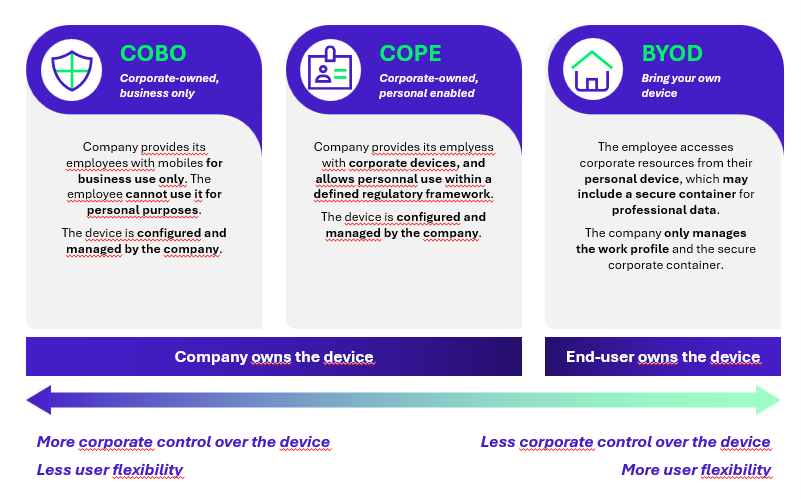
Figure 1 : Mobile device management profiles
Securing mobile devices through 4 tools : MDM, MAM, EMM and MTD
Before going into detail on MDM-like tools, it is worth to remind that several complementary solutions exist for securing mobile devices. These tools operate at several stages:
- MDM (Mobile Device Management) : fleet management and corporate device security tool (mainly at OS level)
- MAM (Mobile Application Management) : application management and security tool (mainly at application level)
- EMM (Enterprise Mobility Management) : a tool centralising MDM and MAM functionalities
- MTD (Mobile Threat Detection) : a tool for detecting attacks on mobile devices, similar to Endpoint Detection & Response (EDR) for laptops (OS and application layers)
The figure below illustrates this ecosystem within a mobile device:
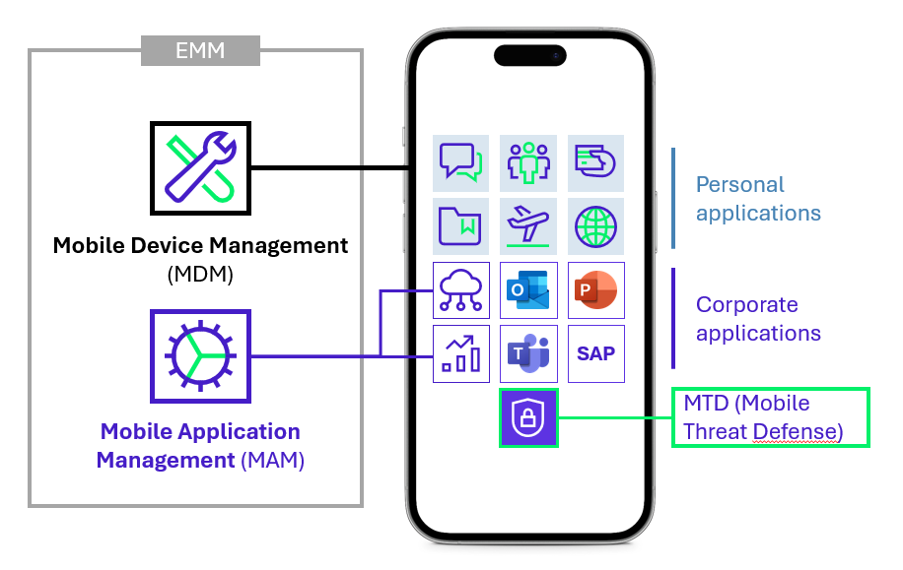
Figure 2 : The enterprise mobility security ecosystem
An MDM, MAM or MTD does not address the same needs and secures the mobile fleet at different levels. The next sections of this article focus only on MDM.
MDM solutions address the need to secure devices owned by the company, and therefore the COBO and COPE policies described above.
A key consideration on BYOD: it is important to keep in mind that devices not owned by the company cannot be fully configured by the company. To secure the BYOD use case, i.e. access to company data and applications from an unmanaged device, MAM solutions can address the need by securing applications and creating a professional container.
In the rest of this article, the BYOD case is considered out of scope. Since the device belongs to the user or to a partner company, the company does not truly control the configuration and security of these devices, as it can hardly require the user to install certain configurations or applications, or to share certain device data. However, it is possible to harden access to the information system to make BYOD usage impossible, but this requires an in-depth impact analysis, considering all use cases (multi-factor authentication on mobile, management of partners and external providers, conflicts between fleet management tools, access to training, etc.).
Mobile Device Management at the heart of securing corporate mobile devices
Mobile Device Management tools make it possible to effectively administrate and secure a complete fleet of mobile devices through three core functions, which are detailed below:
- Fleet management : know and configure the devices accessing the information system, and deploy company or third-party applications.
- Compliance control : ensure that devices comply with the company’s security policies and standards.
- Security and hardening : implement security measures on devices to strengthen protection against threats.
Note: The following paragraphs aim to present features offered by most MDM solutions; the availability of the desired features should be verified before subscribing to any MDM solution.
Administering the corporate mobile device fleet: inventory, administration and provisioning
In response to security and regulatory requirements for device management, MDM centralises many mobile device management features in a single interface:
- Deploy/remove : MDM facilitates the provisioning of new corporate devices for IT teams, potentially remotely with installation of company configurations and business applications, as well as the removal of these configurations and the deletion of company-related data when needed, for example at end of device life, in case of suspected compromise or theft (wipe-out function).
- Manage : MDM inventories all corporate mobile devices and presents their key attributes, for example OS type, OS version, owner name, encryption status, IMEI, last connection date, etc., while ensuring compliance with the General Data Protection Regulation (GDPR).
- Monitor : alerts can be configured in MDM solutions to monitor the health of the fleet and identify any deviation from the rules previously defined by the company.
- Support : MDM includes remote-control and device diagnostic features to facilitate interventions by IT teams.
By providing up-to-date data on the mobile fleet, MDM can help meet various regulatory requirements, particularly regarding knowledge of and ability to manage the fleet, as well as reaction capability in the event of compromission. Several regulations, for example ISO 27002 (section 5.9 Inventory of Information & Other Associated Assets), require companies to identify and manage their devices.
This centralisation provides an overall view of the fleet, while also enabling classification for better administration. In particular, device tagging or grouping systems make it easy to manage subsets of devices that may have configuration variations or exceptions (depending on business needs, for example network teams, VIP users, etc.).
Compliance policies : assessing the compliance of mobile devices accessing company data and applications
More than just fleet management software, MDM solutions can assess the mobile fleet against corporate security policies, known as compliance policies.
Highlighting non-compliant devices can be essential in order to take targeted action: for example, removing their access to the information system through conditional access if the device is jailbroken or does not run the latest OS versions. Since this assessment can be performed at each device connection, fleet compliance can be considered continuously up to date.
This major MDM feature should be fully leveraged. A non-compliant device represents a risk to the company and its information system (presence of unpatched vulnerabilities, etc.). To avoid harming team productivity, the user can be notified as soon as non-compliance is detected, and access rights to company data can be removed through conditional access if the non-compliance is not resolved, by adjusting the compliance status validity period.
Configuration profiles : configuring devices deployed by the company
When corporate mobile devices are provided to employees, a configuration should be applied to protect these devices and align them with a predefined baseline: this is made possible through configuration profiles.
To secure mobile devices, it is possible to customise the baseline in order to professionalise the device, across various platforms (iOS, Android). Common baseline hardening measures include:
- Hardening of security configurations and feature restrictions;
- Deployment of company configuration;
- Restriction of third-party application installation outside the application store.
Devices can then check for the latest configuration profile updates and apply them (frequency to be defined – recommendation: once a day). This setting helps ensure the device remains as close as possible to security best practices at all times.
We recommend the following measures when using an MDM solution:
- Push the security configuration during device enrolment, including at least:
- Hard drive encryption
- Hardened authentication policy (six-digit passcode or biometrics, with simple passcodes blocked)
- Deploy OS and application patches directly
- Detect and block non-compliant devices (at minimum, jailbroken devices)
- Deploy an action plan for non-compliant devices (alerts, blocking, etc.)
In summary, MDM is a fundamental building block and a prerequisite for securing access to the information system
MDM solutions offer numerous interfaces, particularly with other security tools.
In particular, to fully benefit from MDM, it is common and recommended to interface it with the company’s Identity Provider (IDP). Integrating MDM with the identity and access management solution for the information system enables conditional access based on device compliance or attributes (for example, removing remote access to company data for mobile devices that do not comply with the compliance policies defined in the MDM). This contributes to Zero Trust strategies by strengthening the company’s posture through greater control over access to its information system.
It is also possible to connect the MDM tool with Mobile Threat Defense (MTD) solution. This interface with a complementary mobile device protection tool enables information to send back device compliance and health information to the MDM, or whether it presents compromise risks (malware, connection to an unsecured network, etc.). This analysis of the device and its risks can then condition access to the corporate information system.
Finally, although accumulating MDM solutions is not recommended, it is sometimes necessary to interface the MDM solution with other MDM solutions in order to centralise information and manage the entire fleet centrally. For example, it is common to interface Microsoft Intune with Apple Business Manager MDM, which may contain the full database of iOS devices.
Conclusion : key elements to effectively secure a mobile device fleet
In a context of increasing mobility in companies, MDM clearly stands out as a must-have in the race to secure access to corporate information systems.
More than a simple centralised inventory of mobile devices, this solution also simplifies the end-user experience by providing a hardened and secure turnkey device that complies with corporate policies.
To implement an MDM solution effectively, organisations should :
- Cover all mobile devices in the fleet (all types, brands, platforms and business functions): the robustness of an information system is assessed by its weakest links
- Formalise a mobile device management policy adapted to the company’s needs, without major constraints for end users, in order to avoid user misbehaviours and reduce business impact
- Translate this policy into configuration profiles and compliance policies, and keep them up to date
- Raise user awareness of the chosen corporate policy by sharing a corporate mobile device usage charter with users, explaining the benefits of centralised management and respect for user privacy, which requires a clear corporate strategy
- Consider mobile security as a whole, and in particular address BYOD in parallel to avoid workarounds through this channel, by combining MDM deployment with MAM deployment, in order to cover, for example:
- The risk of data leakage (local storage on an unmanaged device, synchronisation with personal cloud services such as Google Drive, unintentional sharing via unsecured applications)
- The risk of data interception over unsecured connections (cafés, hotels, transport)
- The risk of malware propagation across the information system
- In summary, while MDM is now an essential foundation for securing corporate mobile devices, its effectiveness depends above all on a clear corporate strategy and a sufficient level of device hardening.
The most mature organisations can then complement this foundation with MAM and MTD solutions, following a progressive approach adapted to their challenges (in particular, deploying MAM to enable BYOD use cases). It should be noted that MTD solutions are currently not widely deployed, with priority given to implementing the MDM and MAM combination which, when properly configured, can cover a large majority of mobile use cases, from managed corporate phones to personal phones.